
How to compress photos on Android
Last updated: 26 September 2026
A photo from a modern phone camera is often several megabytes. Compressing it keeps the same picture at a much smaller file size, which frees up storage and makes photos quicker to send. PixPress does this on your Android phone, many photos at a time, without uploading them anywhere.
Compress photos in five steps
- Open PixPress and tap Add Photos, then pick one photo or up to 25 at once. You can also share photos to PixPress from your gallery app.
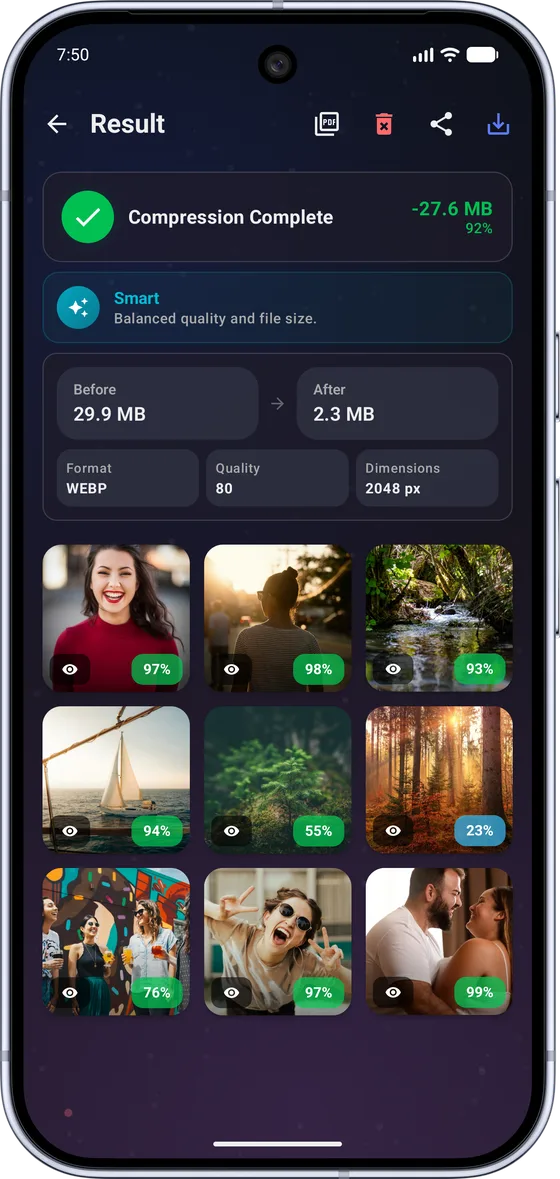
- In Compression Settings, choose Smart. Smart mode tries JPEG and WebP for each photo and keeps whichever comes out smaller.
- Tap Compress.
- On the result screen, tap Compare and drag the slider to check the compressed photo against the original.
- Tap Save All. The compressed copies are saved to Pictures/PixPress, and your original photos are not changed.
Which mode to choose
- Smart suits most photos. You do not need to know anything about formats or quality.
- Custom lets you set the format, quality and maximum dimension yourself, or start from a preset such as WhatsApp, Instagram or Email.
- Size Limit is for when a website or app has an upload limit. Set a maximum file size from 10 KB to 5,000 KB and PixPress keeps each photo at or below it.
Using compression to free up storage
PixPress saves compressed copies instead of replacing your photos, so nothing is lost if a result is not what you wanted. The result screen shows how much space the batch saved. Once you have compared the photos and are happy with them, you can delete the larger originals in your gallery app to get that space back.
Supported photos
PixPress opens JPG, PNG and WebP photos, plus HEIC on Android 9 and newer. It saves in JPEG or WebP, and in PNG when you need a lossless or transparent image (a Pro feature). It works on Android 7.0 and newer.
When PixPress compresses a photo, it removes the GPS location by default, so the copy you share does not reveal where it was taken. You can change this under Metadata Privacy.
Common questions
Does compressing a photo lower its quality?
Compression removes detail that is hard to see, so a well-compressed photo looks almost the same on a phone or computer screen. Use the Compare slider to check each result before you save it.
Is PixPress free for this?
Yes. PixPress is free for up to 25 photos at a time, including Size Limit and all presets. It is supported by ads, with an optional Pro subscription for batches of up to 200 photos and an ad-free experience.
Are my photos uploaded?
No. PixPress compresses photos on your phone and does not upload your selected photos to PixPress servers. Compression works offline.
Does PixPress delete my original photos?
No. PixPress saves compressed copies to Pictures/PixPress and leaves your originals as they are. You decide whether to delete the originals.
More guides
- How to reduce photo size for email
Make photos small enough to attach, then share them straight to your mail app.
- How to resize a signature for an online form
Crop, resize and compress a scanned signature to fit a form's size limit.
- How to compress a photo to 20 KB
Get a photo or signature under 20 KB with the right preset.